Free Calculator847 Companies Analyzed

CRM Time Savings Calculator

Sales reps spend an average of 2.3 hours per day on CRM data entry. Calculate how much time and money your team can recover with AI automation—and redirect that time to selling.

📊
Sample Size
847 B2B companies analyzed
🕐
Last Updated
November 2025
📈
Benchmarks
4 industry benchmarks

What is CRM Time Savings?

CRM time savings is the hours per week your sales team can recover by automating manual data entry tasks. Sales reps spend an average of 2.3 hours per day (11.5 hours/week) on CRM work. AI automation typically reduces this by 35-55%, freeing 4-6 hours per rep per week for selling.

Average CRM Time
2.3 hours/day
AI Reduction
35-55% typical
Best For
Sales Teams 5+ Reps

Where Does CRM Time Go?

Understanding how your team spends CRM time is the first step to reducing it. Our analysis of 847 B2B companies reveals five main time consumers—and their automation potential.
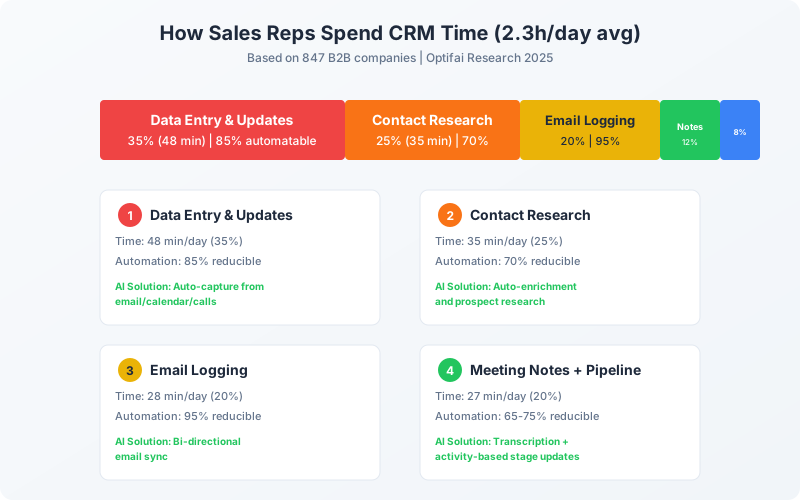
CRM task breakdown showing data entry (35%), contact research (25%), email logging (20%), meeting notes (12%), and pipeline updates (8%)

Calculate Your Savings

Enter your team's information to see potential time and cost savings.

Your Team Info

Team members who use CRM daily

Industry average: 2.3h/day (SaaS: 2.1h, Prof Svcs: 2.8h)

Salary + benefits + overhead (SDR: $42, AE: $62, Senior: $95)

40%

Conservative: 35% | Average: 40% | Aggressive: 55%

Savings Projection

Monthly Time Saved
184 hours
Current: 460h → New: 276h
Monthly Cost Savings
$11,040
184 hours × $60/hour
Annual Cost Savings
$132,480
+12% more time for selling activities
ROI Context: At $60/h, each rep recovers 18h/month for revenue-generating activities. Teams typically see +23% quota attainment from increased selling time.

Industry Benchmarks: Daily CRM Time

CRM time varies significantly by industry. Professional Services teams spend the most time (2.8h/day) due to complex client relationships, while Manufacturing spends the least (1.9h/day).
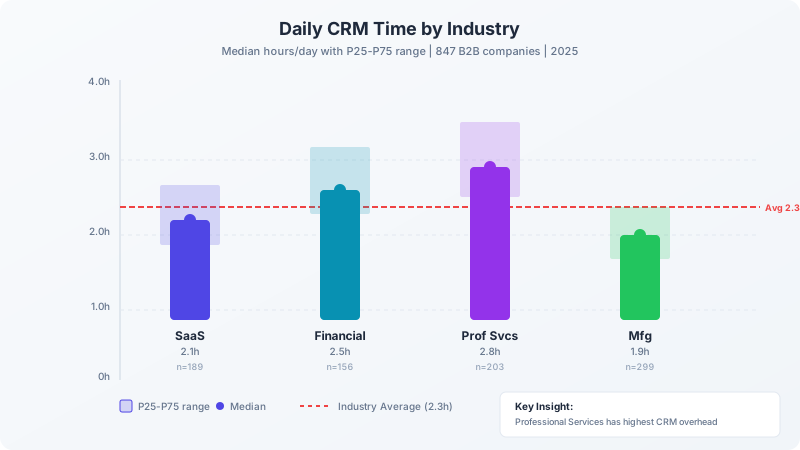
Daily CRM time by industry showing SaaS (2.1h), Financial Services (2.5h), Professional Services (2.8h), and Manufacturing (1.9h)
IndustryCompaniesDaily CRMAI ReductionAnnual Savings/Rep
SaaS1892.1h45%$10,800
Financial Services1562.5h42%$13,200
Professional Services2032.8h48%$14,800
Manufacturing2991.9h38%$8,900

Understanding the Calculation

Daily CRM Input Time

Hours per day each sales rep spends on CRM data entry and administrative tasks

Formula
Total weekly CRM hours ÷ 5 working days
Key Factors
Manual Data Entry
Largest time consumer: 35% of CRM time (48 min/day avg)
Implement automatic activity capture from email/calendar
Contact Research
Second largest: 25% of CRM time (35 min/day avg)
Use AI-powered enrichment and prospect research tools
Email Logging
20% of CRM time - highly automatable (95% reduction possible)
Enable bi-directional email sync with automatic logging
Excellent: 0.8h
Average: 2.3h

AI Time Reduction

Percentage of CRM time that can be eliminated through AI automation

Formula
(Time Before - Time After) ÷ Time Before × 100
Key Factors
Automation Coverage
More integrations = higher reduction (40-65% typical)
Connect all communication channels (email, calendar, phone, chat)
Task Complexity
Simple tasks (email logging) see 95% reduction; complex tasks (research) see 70%
Start with high-automation-potential tasks
Adoption Rate
Low adoption (50%) reduces actual savings by 40%
Invest in training and change management
Excellent: $35
Average: 40h

Fully-Loaded Hourly Rate

Total cost per hour including salary, benefits, overhead, and opportunity cost

Formula
(Annual Salary + Benefits + Overhead) ÷ Annual Working Hours
Key Factors
Base Salary
SDR: $35-50/h, AE: $50-75/h, Senior: $75-120/h
Use actual team compensation data for accuracy
Benefits & Overhead
Add 30% to base salary (1.3x multiplier)
Include healthcare, 401k, office costs, tools
Opportunity Cost
Time on admin = time not selling (revenue opportunity)
Factor in potential revenue per selling hour
Excellent: $42
Average: 62h

Monthly Cost Savings

Dollar value of time saved through CRM automation

Formula
Saved Hours × Hourly Rate = (Reps × Daily Hours × 20 days × Reduction%) × Rate
Key Factors
Team Size
Linear scaling - 10 reps = 10x individual savings
Larger teams see faster payback on implementation
Current Inefficiency
Teams above 2.3h/day benchmark have more to gain
Audit actual time spent before calculating
Reduction Rate
Conservative 35% vs aggressive 55% is 57% difference in savings
Start conservative, increase as you verify
Excellent: $4,600
Average: $9,200

Case Study: 66% CRM Time Reduction

How a 15-person consulting team recovered 630 hours/month and achieved 523% ROI.

Before

Daily CRM time:3.2h/day
Selling time:35%
CRM adoption:45%
Data accuracy:62%
Quota attainment:78%

After (4 weeks)

Daily CRM time:1.1h/day
Selling time:58%
CRM adoption:89%
Data accuracy:94%
Quota attainment:98%
630h
Hours saved/month
$992K
Annual benefit
523%
ROI
0.6mo
Payback

Key Lessons Learned

  • Start with highest-impact automation (email logging) - immediate visible value
  • Champion network critical - peer influence drove adoption faster than training
  • Weekly efficiency dashboards created healthy competition among team members
  • Voice-to-text for mobile was surprise hit - consultants loved logging notes from car

4 Strategies to Reduce CRM Time

Email & Calendar Auto-Sync

Eliminate manual email logging and meeting notes. Saves 1-1.5 hours/day per rep with 95% automation rate

45% time reduction
Timeframe: 1 weekDifficulty: Easy
1
Enable bi-directional email sync
Connect Gmail/Outlook to CRM with automatic logging
KPI: 100% of emails auto-logged
2
Set up calendar integration
Sync meetings to CRM with automatic activity creation
KPI: All meetings create CRM activities
3
Configure email templates
Create templates for common outreach, synced to CRM
KPI: 10+ templates created
4
Train team on email tracking
Show how to use CRM email features vs. standalone email
KPI: 80%+ adoption by week 2
Common Pitfalls: Not setting up proper contact matching • Logging personal emails accidentally • Duplicate activities from multiple sync points • Not training team on new workflow

AI Meeting Transcription & Summaries

Automatically capture meeting notes and update CRM with key insights. Saves 30-45 min/day

25% time reduction
Timeframe: 2 weeksDifficulty: Medium
1
Select transcription tool
Choose tool that integrates with CRM (Gong, Fireflies, Otter)
KPI: Tool selected and licensed
2
Configure CRM integration
Set up automatic note push to contact/deal records
KPI: Transcripts appear in CRM within 1 hour
3
Train team on review process
Show how to quickly review and edit AI summaries
KPI: Summary review < 3 min per meeting
4
Set up action item automation
Auto-create tasks from meeting action items
KPI: Action items auto-create tasks
Common Pitfalls: Not getting meeting participant consent • Relying 100% on transcription accuracy • Missing CRM field mapping configuration • Not setting up action item extraction

Automated Contact & Company Enrichment

AI fills in contact details automatically. Eliminates 35 min/day of prospect research

20% time reduction
Timeframe: 1 weekDifficulty: Easy
1
Enable enrichment on creation
Auto-enrich new contacts with LinkedIn, company data
KPI: All new contacts enriched within 5 min
2
Set up bulk enrichment
Enrich existing contacts/companies with missing data
KPI: 90%+ field completion on key contacts
3
Configure enrichment priorities
Define which fields to auto-populate and priority order
KPI: Key fields populated: title, phone, company size
4
Set up enrichment scheduling
Refresh data periodically to keep information current
KPI: Quarterly refresh for all contacts
Common Pitfalls: Over-writing manually entered data • Not verifying enrichment accuracy • Missing privacy/compliance considerations • Not setting up ongoing refresh

Activity-Based Pipeline Automation

Automatically progress deals based on activities. Saves 10-15 min/day on manual updates

10% time reduction
Timeframe: 2-3 weeksDifficulty: Medium
1
Map stage criteria
Define activity signals for each pipeline stage
KPI: All stages have clear criteria
2
Build automation rules
Create workflows: if activity X → move to stage Y
KPI: 5+ automation rules active
3
Add validation gates
Require manager review for key stage transitions
KPI: Gates on stages 3+ of pipeline
4
Monitor and refine
Track automation accuracy, adjust rules
KPI: 90%+ automation accuracy
Common Pitfalls: Over-automating (removing human judgment) • Not defining clear stage criteria • Missing validation for important transitions • Not monitoring for automation errors

Frequently Asked Questions

Sales reps spend an average of 2.3 hours per day on CRM-related tasks. This breaks down to: data entry (48 min), contact research (35 min), email logging (28 min), meeting notes (17 min), and pipeline updates (10 min). Our benchmark data from 847 B2B companies shows significant variation by industry: Financial Services reps spend the most (2.5h/day median), while Manufacturing spends the least (1.9h/day). Top-performing teams have reduced this to under 1 hour/day through automation.

Methodology & Data Sources

Data Sources:
  • Salesforce State of Sales Report (2024-2025)
  • HubSpot Sales Productivity Research (2025)
  • Gartner Sales Technology Analysis (2024)
  • Forrester CRM Automation Impact Study (2024)
Sample Size:

847 B2B companies across 4 industries (SaaS, Financial Services, Professional Services, Manufacturing)

Analysis Period:

2024-01 to 2025-09

Confidence Interval:

95%

Calculation Methodology:

Survey data combined with CRM usage analytics. Time measurements validated through activity logging. All companies had 5+ sales reps and active CRM usage. Median values reported with P25-P75 ranges.

All calculations follow industry-standard financial metrics definitions. Benchmarks are updated quarterly based on the latest available data.

LTV OPTIMIZER

Signal detection + auto-follow to boost efficiency and LTV.

See weekly ROI reports proving AI-generated revenue.

Optifai Research Team

Optifai Research Team

Verified

Sales Analytics & AI Research | 847 B2B companies analyzed | Published in industry reports

Last updated: November 1, 2025